Mega Testing Platform
Question Pool
Description
- This page is covered all the management of question pools.
- All the following functionalities can be performed in this page.
- Following figures will help you to understand all the components in this page.
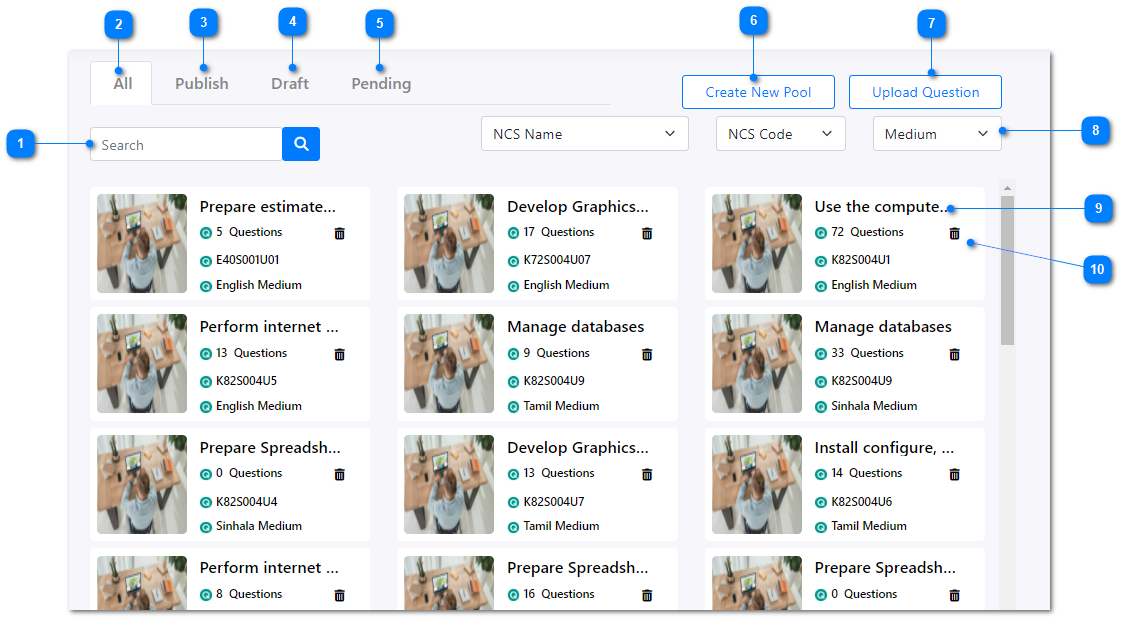
- You can enter a question pool name to use the search functionality here to filter the list of question pools.
- In all tab, all the available question pools will be listed out.
- In publish tab, all the question pools which were already published will be listed out.
- In draft tab, all the question pools which were created, saved as drafts, and not published yet will be listed out.
- In pending tab, all the question pools which were not approved yet will be listed out.
- Create a new question pool.
- You can upload new questions to create a question pool.
- XML, XLSX, XLS will be the supported formats of uploading files.
- Also the related NCS Name and Code with the language medium should be entered while uploading.
- You can filter the question pools list based on NCS name, NCS code, and medium.
- If you click on the name of any question pool, you can view and edit all the details.
- Click on this icon to delete a question pool.