Mega Testing Platform
Mock Exam
Description
- This page is covered all the management of mock exams.
- All the following functionalities can be performed in this page.
- Following figures will help you to understand all the components in this page.
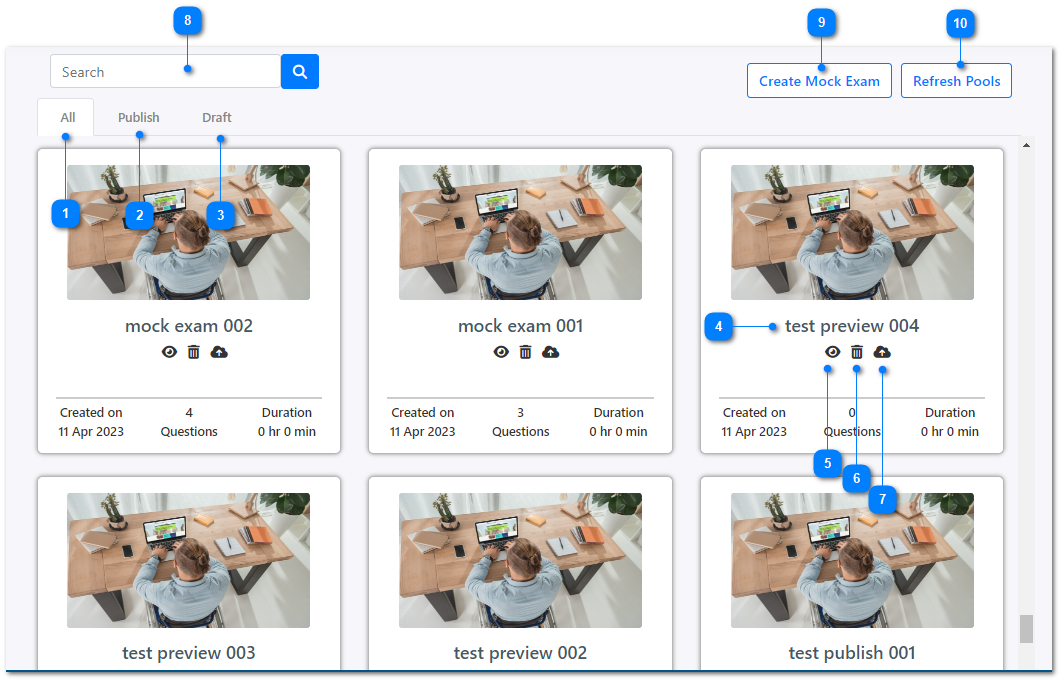
- View the list of all the mock exams that you created.
- View the list of already published mock exams.
- View the list of mock exams which were saved as draft.
- Click on the name of any mock exam to view and edit. More details can be found in this page.
- Click on this icon to preview the selected mock exam to see the same way how the users will attempt it.
- Delete the mock exam.
- Publish the selected mock exam.
- You can enter a mock exam name to use the search functionality here to filter the list of mock exams.
- Create a new mock exam.
- Refresh the question pools.